
FyreJs Documentation
Deprecation Notice!
Section titled “Deprecation Notice!”📢 I don’t plan on adding any additional features or functionality as I’ve re-implemented it as a hosted service over at desertice.link/reactfyre
Prerequisites
Section titled “Prerequisites”- Streamer.bot - https://streamer.bot
- OBS - https://obsproject.com/
Fyre.js Info and config documentation
Section titled “Fyre.js Info and config documentation”Installation and usage
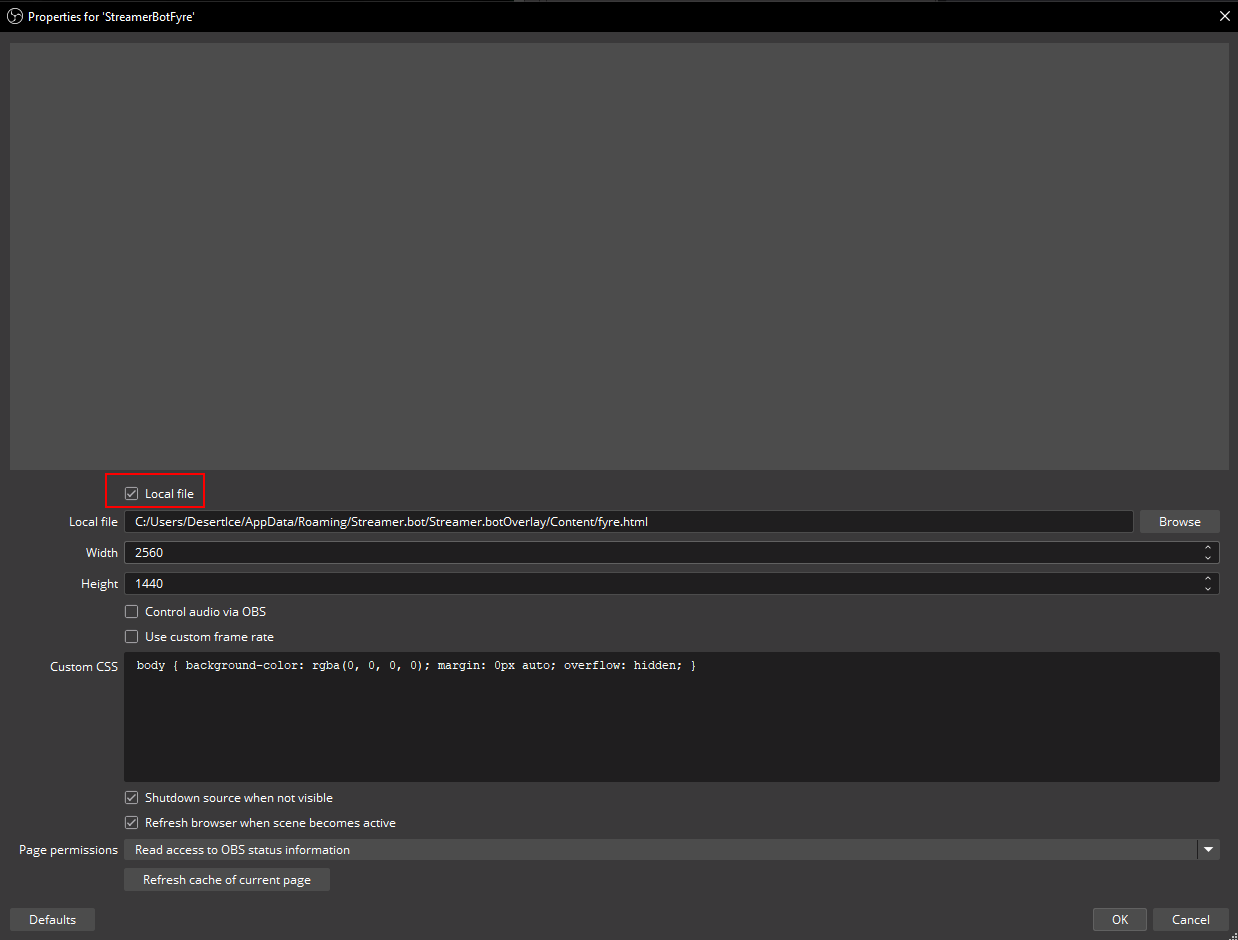
Section titled “Installation and usage”Place the folder anywhere where OBS can use fyre.html as a local file browser source.
Be sure to click the “Local file” checkbox and use the browse button to set the file path.
In StreamerBot, Servers/Clients => Websocket Server needs to be started. I highly recommend checking the Auto Start so you don’t have to do this in the future.
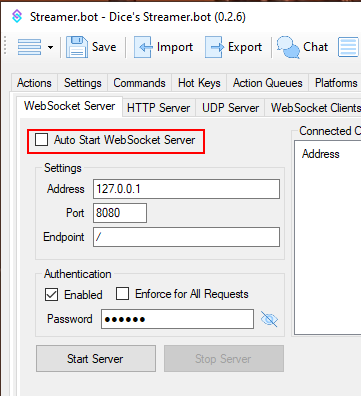
Authentication is not needed for FyreJS
If you’re using Nutty’s Ad overlay, this should already be setup similarly.
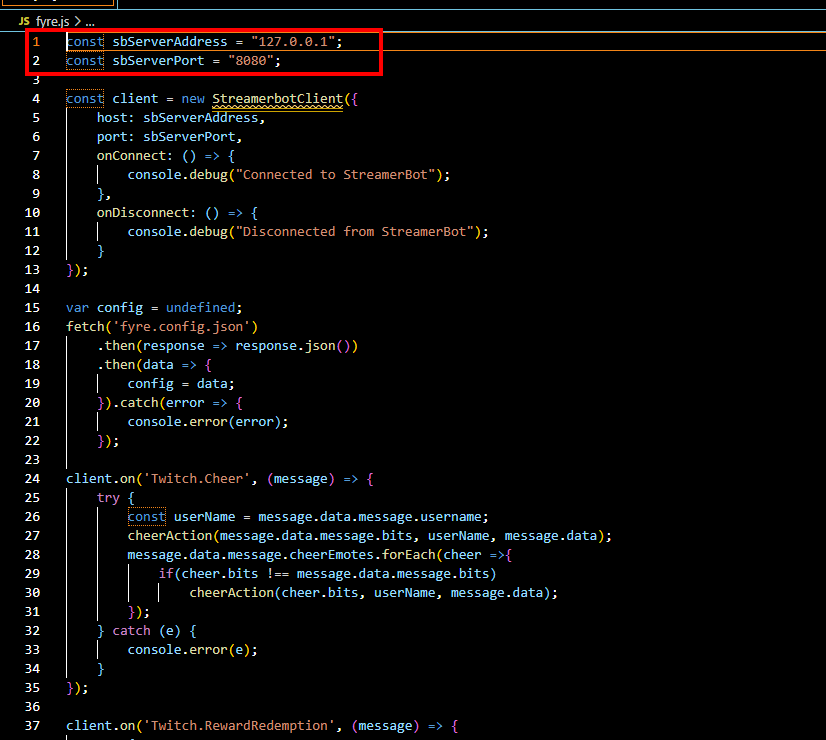
If you have a none standard IP/URL or port, this can be adjusted at the top of fyre.js
All the behavior is driven by the fyre.config.json, so a semi decent text editor can be your friend here. I highly recommend VS Code as it has great json syntax support.
For testing given alerts, you can use StreamerBot’s functionality to “Simulate Events”. A dummy action with a trigger for the given cheer amount has this in the context menu as of Streamer.bot 0.2.3
Update installations
Section titled “Update installations”Copy and overwrite the following files
- fyre.html
- fyre.js
❕ fyre.config.json is provided for new installations and a reference file to syntax / format.
As such, over-writing this file for updates is not advised
Config file notes
Section titled “Config file notes”Important: the path separator for files is web based so use a single ‘/’ characters.
Section titled “Important: the path separator for files is web based so use a single ‘/’ characters.”Start delays are ranges up to. i.e. a given event will wait zero to value in milliseconds.
-
This is to prevent every cheer to occur on the same exact frame.
- ‘default_start_delay’ - a catch all start delay if not provided for a given cheer amount
- ‘cheers’ - the per cheer config. The initial number is the cheer amount applicable.
"30": {"alert_type": "RandomLocation","start_delay": 5000,"volume": 0.3,"video_files": ["fyreVideos/Soup.webm"]}i.e. 30 is the cheer amount for this alert.
-
Redemptions - handle channel point redemption effects with the same alerts
"Redemptions": {"Logistics Drone": {"alert_type": "Thrown","start_delay": 200,"min_duration": 2000,"max_duration": 2200,"min_rotations": 0,"max_rotations": 0,"volume": 0.25,"directions": ["Up","Right","Down","Left"],"image_files": ["fyreImages/factorioRobot/factorio_robot_1.gif"],"audio_files": ["fyreAudio/factorioRobot/factorio_robot_1.ogg"]}} -
Commands - handle commands being triggered with the same alerts
Note:
the command name is the actually command text and not the name of the command.This is fixed as of 0.2.7. It now prefers the command name then the command text"Commands": {"!test": {"alert_type": "RandomLocation","start_delay": 1000,"video_files": ["fyrevideos/waterdrop.webm"]}} -
‘alert_type’ - How the framework picks a location for said video, or plays a sound. Current accepted values are [Location, RandomLocation, Sound, Thrown, SBAction, Edge].
-
Location - Will place the video at the provided location. Coordinates are either 0-1 or precise pixel value. Anchor position is the upper left of the screen / video (blame HTML for this). Location values: ‘x_location’ & ‘y_location’ respectively. Uses video_files
"1":{"alert_type": "Location","x_location": 0.5,"y_location": 0.5,"start_delay" : 1000,"video_files": ["fyrevideos/waterdrop.webm"]} -
RandomLocation - The framework will take the height / width of the video into account and fit the video somewhere in the screen without scaling. Uses video_files
-
Sound - Only uses audio_files
-
Thrown spawns an image on one side of the screen and “throws” it to the across the screen. Uses image_files and sound_files
- min_duration - the minimum lifetime of the image existing in milliseconds
- max_duration - the maximum lifetime of the image existing in milliseconds
- min_rotations - the minimum number of rotations the image will perform 50/50 on either clockwise or anti-clockwise
- max_rotations - the maximum number of rotations the image will perform 50/50 on either clockwise or anti-clockwise
- directions - optional list of directions the image will be “thrown” towards. If omitted, all four are considered randomly.
- direction_map - a more granular version of directions to specify source => destination edges
-
config differences, precedence: direction_map -> directions -> random of all “directions”
"direction_map": {"Up": ["Right","Down","Left"],"Right": ["Up","Down","Left"],"Down": ["Up","Right","Left"],"Left": ["Up","Right","Down"]}vs
"directions": ["Up","Right","Down","Left"]
-
-
SBAction - Invokes a given Streamerbot action by name. All the cheer data is passed along as a JSON object
-
action_name - The name of hte given action to run
-
Example config
"22": {"alert_type": "SBAction","action_name": "testAction"}
-
-
-
Edge - Creates an alert on the “edge” of the viewport
-
duration - can be put on the alert level or the variant to dictate how long the image is visible
-
audio_files - can be put on the alert level or variant
-
edges - an array collection of variants
- side - which side this variant spawns on
- image_file - the file path to the image file
- rotation - set a rotation on the image in degrees
- random_flip - 50/50 chance to do a flip. Supported values are [H, V, B]
- force_flip - force do a flip. Supported values are [H, V, B]. Takes precedence over random_flip
- H - Horizontal
- V - Vertical
- B - Both
- Example config
{"side": "Bottom","random_flip": "H","rotation": 270,"image_file": "fyreImages/catBoop/boop_left_3.png"}
-
-
CustomActions - Like the name says. There are named alerts to be called manually from code in StreamerBot
-
Example Config.
"CustomActions":{"BitBadgeToss":{"alert_type" : "Thrown","start_delay" : 5000,"min_duration" : 1000,"max_duration" : 1500,"min_rotations": -20,"max_rotations": 20,"volume": 0.25,"directions":["Up", "Right", "Down", "Left"],"image_files" : ["fyreImages/bitBadges/1.png","fyreImages/bitBadges/100.png","fyreImages/bitBadges/900k.png"],"audio_files": ["fyreAudio/whoosh/ES_Tennis Racket, Swing, Swipe 01 - Epidemic Sound.mp3","fyreAudio/whoosh/ES_Wood Pole, Thin, Swing Through Air, Swoosh 03 - Epidemic Sound.mp3"]}} -
Example C# code to be used in specific edge cases
using System;using Newtonsoft.Json;public class CPHInline{public bool Execute(){var json = JsonConvert.SerializeObject(new {type = "BitBadgeToss"});CPH.WebsocketBroadcastJson(json);return true;}}📌 For example I use this for a variable amount of bit badge throws every time a bit badge upgrade occurs.
-
-
These options are reused in various alert types
- ‘video_files’ - This is a list of relative paths to files that a given cheer can play. The framework will randomly select one.
- ‘start_delay’ - This behaves just like the ‘default_start_delay’, but on a per alert level.
- ‘volume’ - Value from 0-1 for adjusting volume on audio or video types.
- image_files - This is a list of images randomly selected
- audio_files - optional list of sounds to play along with the image
Video notes
Section titled “Video notes”The framework should support any web friendly video format, but I’ve mainly tested using .webm
If there is a particular other format worth testing with, please let me know. Providing a test example is even better.
Footnotes
Section titled “Footnotes”In general, this is a very simple framework and delegates as much as possible to the alert assets. I’m also open to feature suggestions, etc. I’ve only tested relative pathing for the assets.